
Products
★ Virtual Device ★
★ Audio ★
★ Screen Recorder ★
★ Converter ★
★ Disc ★
How to Change Your Voice in Real Time During Voice Chat?
Preparation
Click the button above to download and install ZGZ Virtual Microphone software.
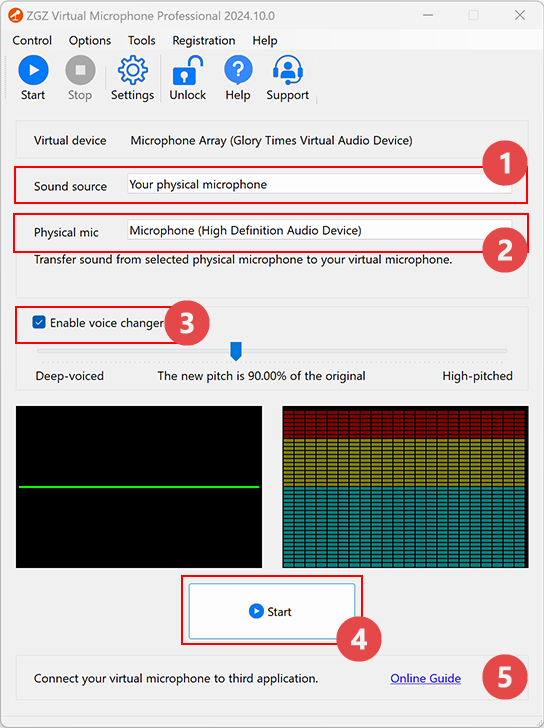
1. Select "Your physical microphone" from the "Sound Source" dropdown.

2. Select your physical microphone.

Make sure your physical microphone is connected to your computer before starting the app.
3. (Optional) Enable the voice changer.

- Lower the pitch to make your voice deeper.
- Raise the pitch to make your voice sharper.
- To change a female voice to a male voice, lower the pitch.
- To change a male voice to a female voice, raise the pitch.
- To create a cute baby voice, raise the pitch to the highest comfortable level.
4. Click the "Start" button.

Your voice will now be changed and sent through the virtual microphone.
Congratulations! You’re all set.
Privacy Policy
Terms of Service
About
Site Map
Copyright© 2002-2026 ZGZSoft Inc. All rights reserved.